Automotive & retail shop management
Run the whole shop
from one screen.
Work orders, parts, scheduling, the register and the books — in one system, so the job on the lift and the money in the drawer are the same story.
No card required. Priced per shop, not per seat.
One ticket, every stage
JB-1042The parts, the labor, the technician and the payment all stay on the same record — so what the job made is calculated, not estimated.
One ticket, from the phone call to the keys going back
A job passes through six hands between the first call and the handover. Here is the same job at each stage, in the screens that actually run it.
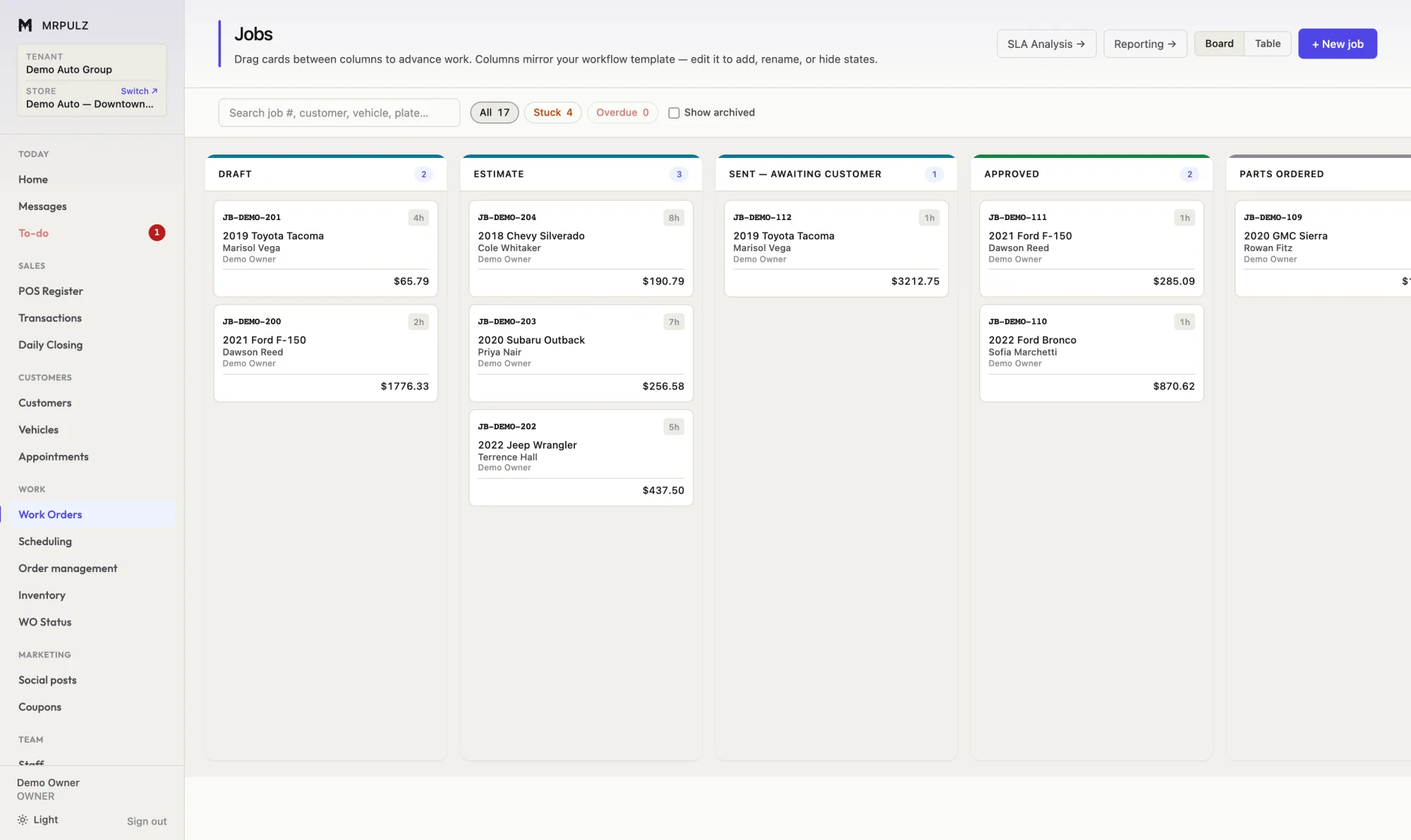
The estimate goes out, and you can see it sitting there
A job starts as a ticket with the customer, the vehicle and what they came in for. Quote it, send it, and it moves to "awaiting customer" on its own.
Anything that has been sitting longer than it should is flagged. The estimate that went out nine days ago is visible without anyone going looking for it.
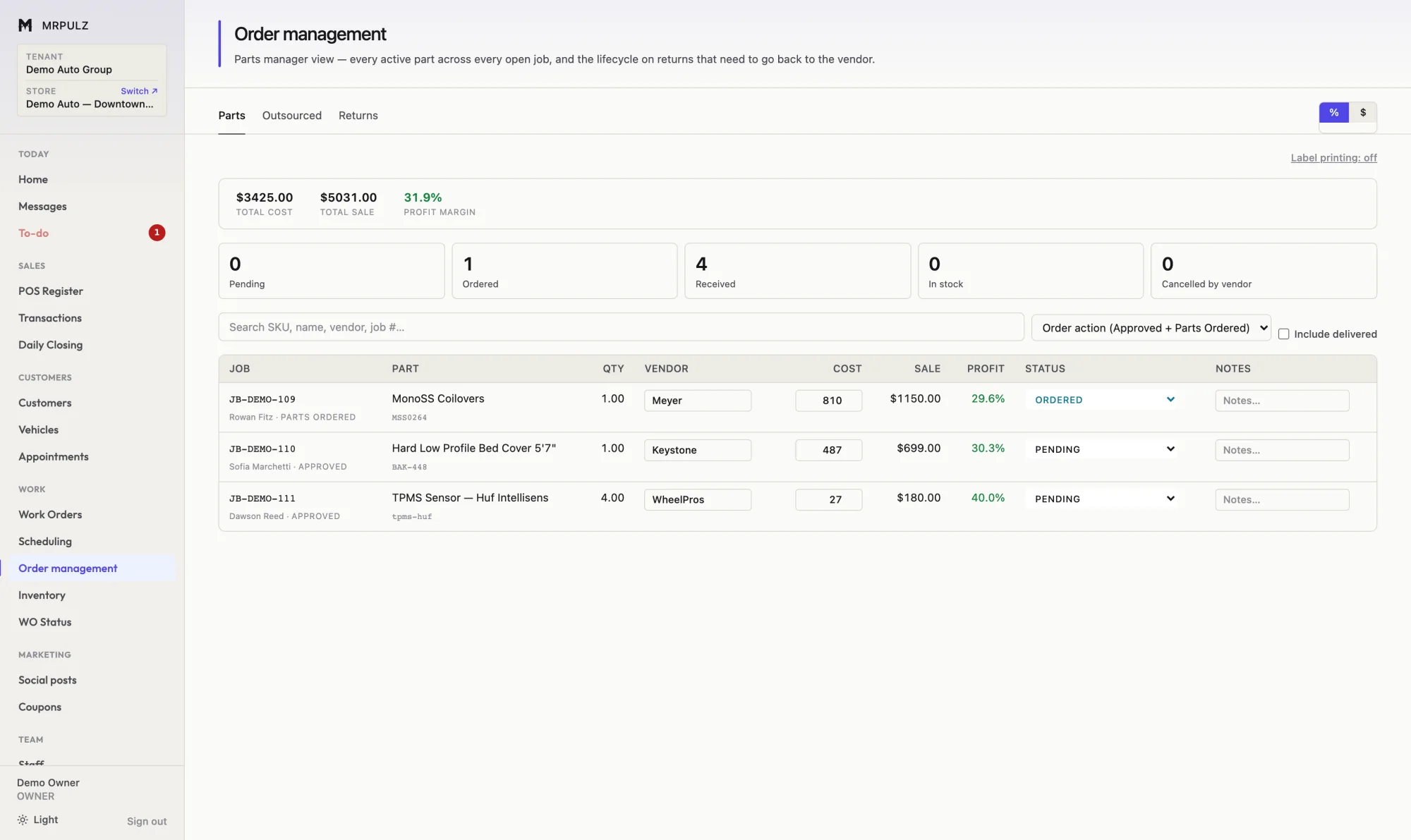
Order the parts, and know the margin before they ship
Parts are ordered against the job that needs them, with the vendor, the cost, the sale price and the margin on each line. If the part is already on the shelf, the cost comes from inventory rather than being typed again.
Missed costs get caught before a job is closed out, so the profit figure at the end is built on real numbers rather than assumed ones.
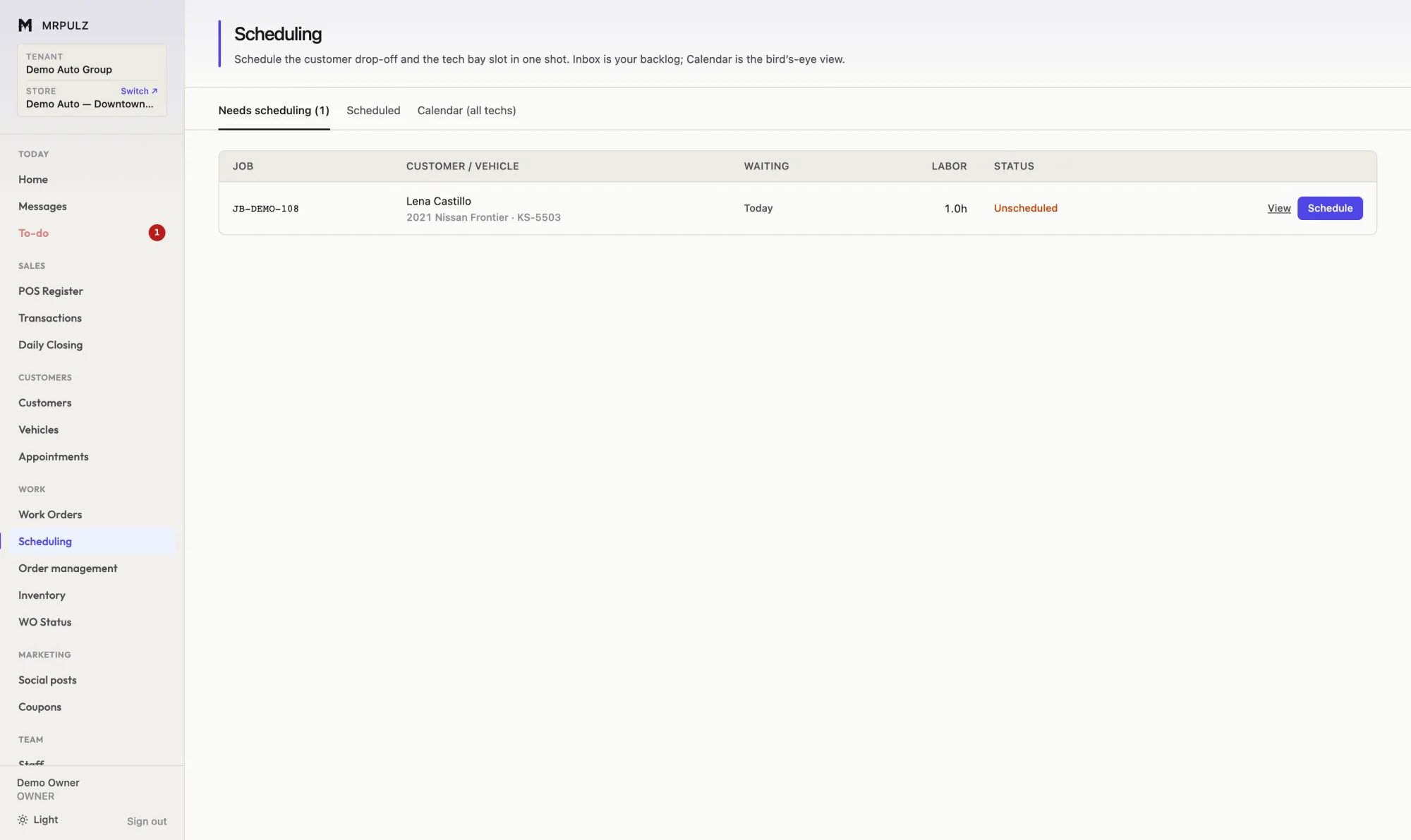
Book the bay and the technician together
Approved jobs queue up as a backlog, so nothing approved quietly falls out of sight. Schedule the customer drop-off and the technician slot in the same action.
The calendar shows the week across every technician with the hours each job is expected to take, so a day does not get quietly overbooked.
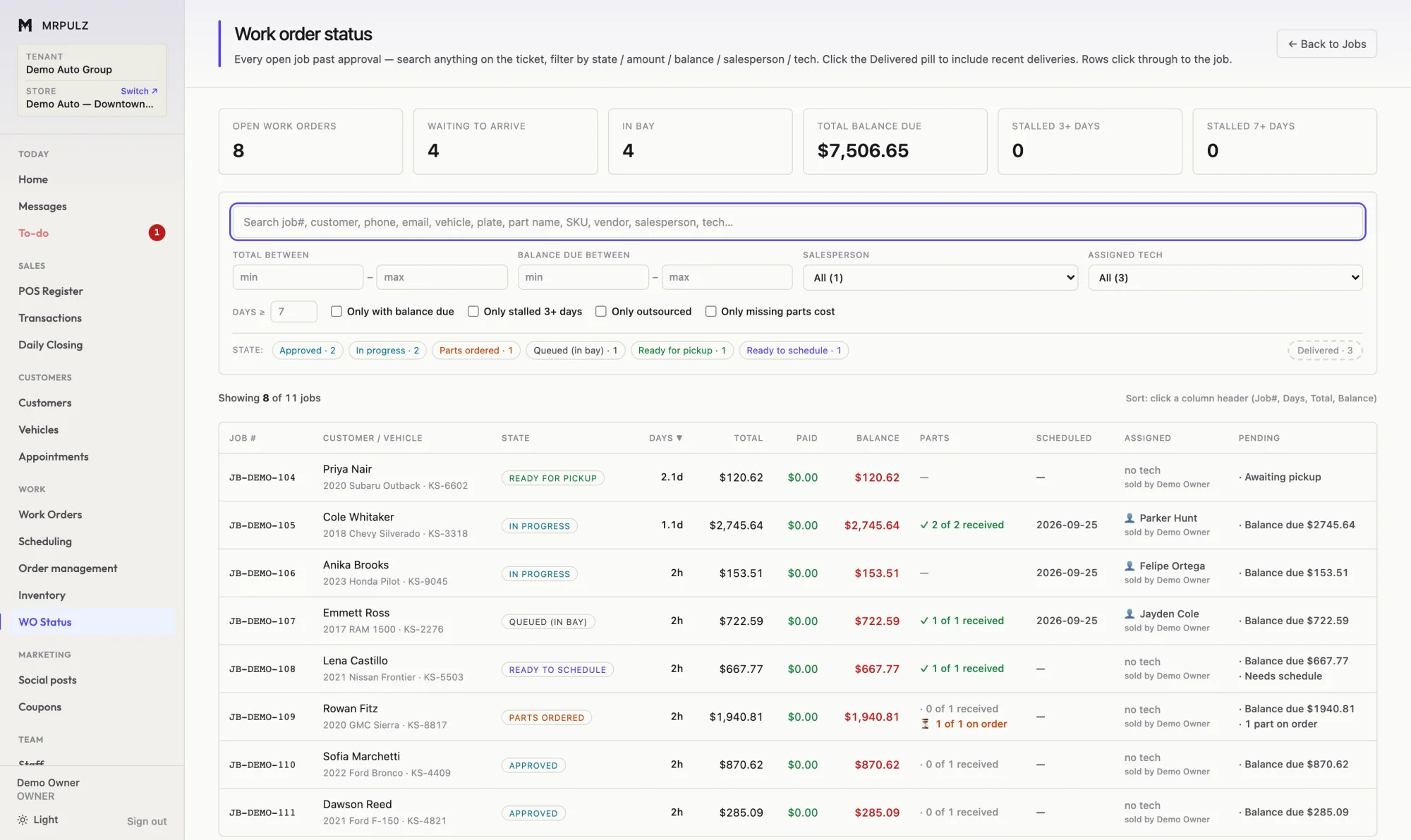
Every open job, and exactly where it is stuck
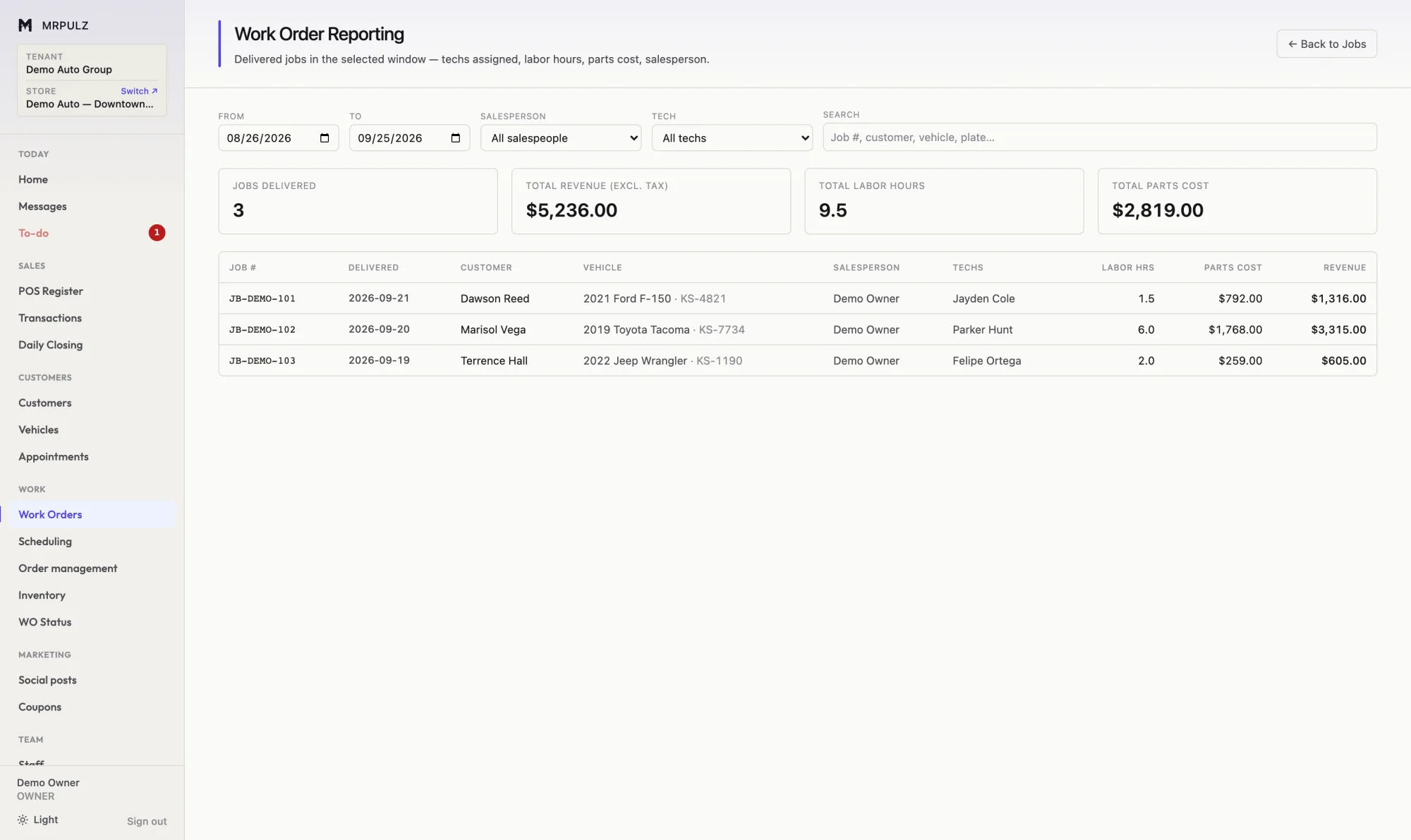
One table with every open job past approval: what it is worth, what has been paid, what is still owed, whether the parts have landed and who is on it.
Search anything on the ticket — job number, customer, phone, plate, part name, SKU, vendor. Filter to the jobs still missing a parts cost and fill them in from the same screen.
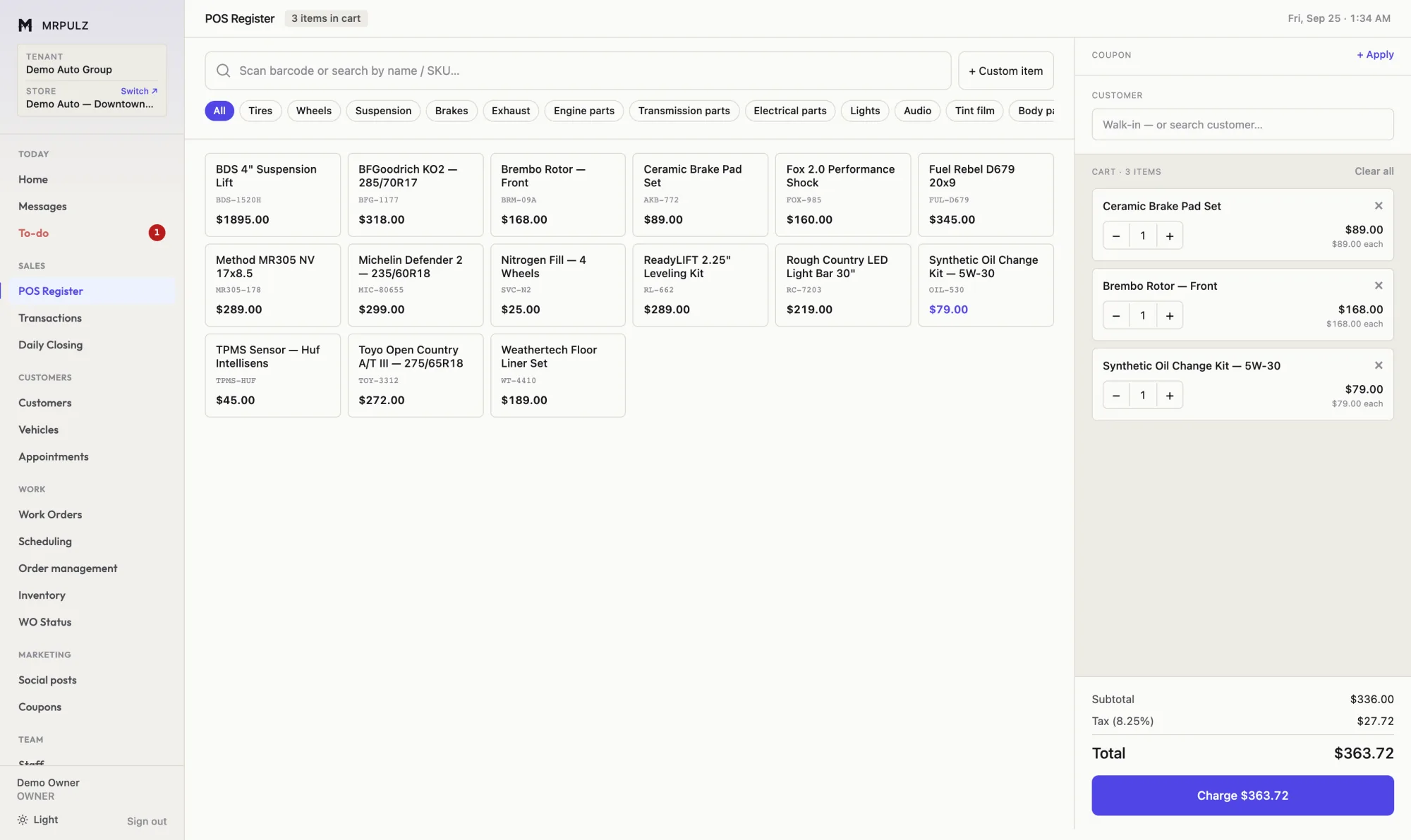
Take the money at the counter
The register rings parts and labor off the same catalog the work orders use. Split the payment across cash, card and store credit; the card fee is recorded as a fee rather than quietly eaten.
Stock comes down as it sells and the sale posts to the books immediately. There is no end-of-day re-entry.
See what you actually kept
Job profit starts from what the customer paid and works down: parts at cost, technician pay at what the tech is actually paid, tax collected for the state, card fees and any discount given at the counter.
Every share is measured against the same total, so the percentages compare between jobs. A job that lost money is shown as having lost money.
Built for more than one shop
A second location should not mean a second system
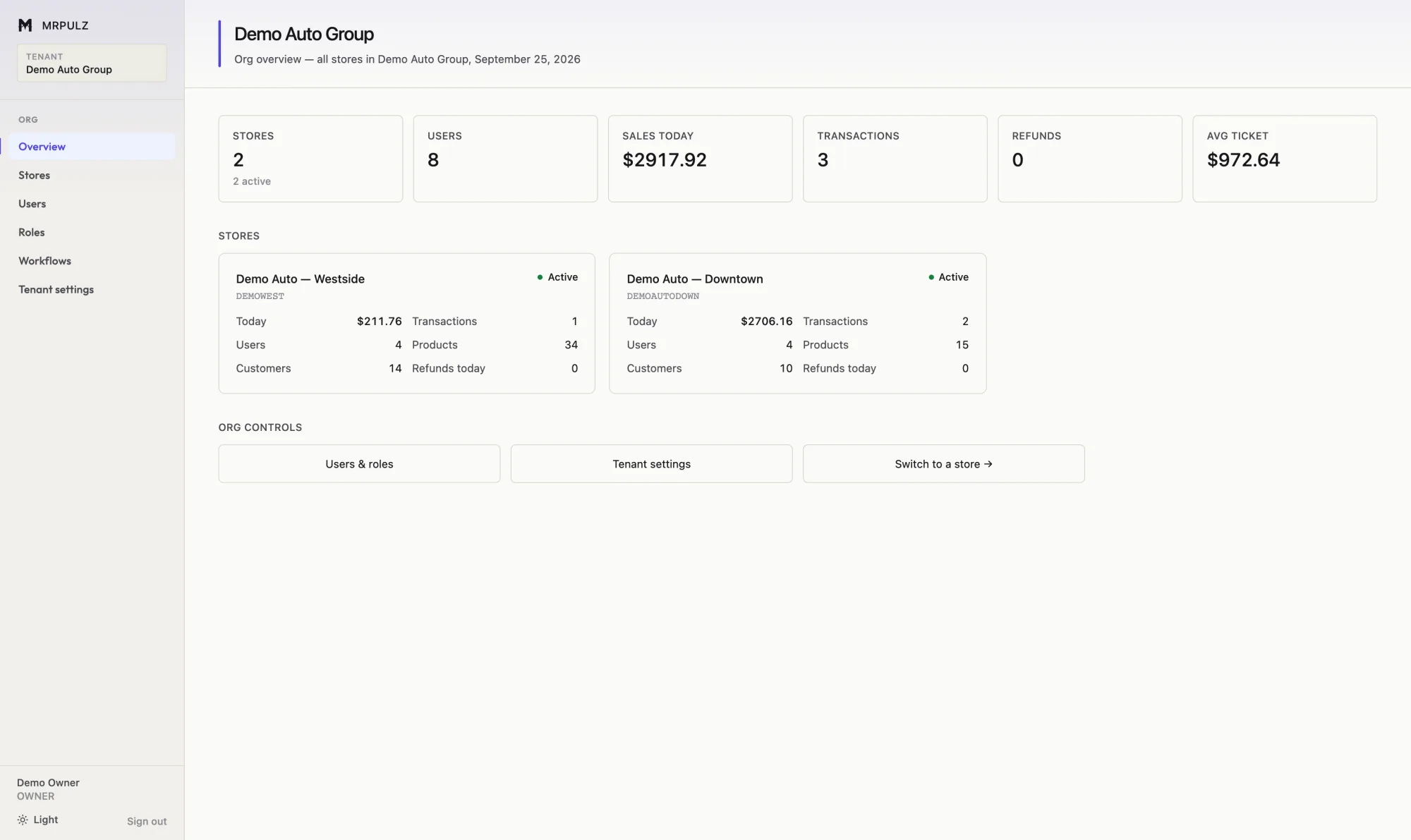
MRPULZ is organized around a company that may run several shops. Each location keeps its own inventory, staff, books and job numbering — because they are genuinely separate operations, and merging them would give you figures that mean nothing.
What is shared is shared on purpose: your people, your roles and permissions, and the workflow templates that define how work moves. Set the process once and every shop follows it, or give a location its own.
Staff are scoped to the shops they actually work at and switch between them without signing out. Adding a location is a form — it arrives with its accounts, categories, tax settings and workflow already in place.
Everything it does
One system rather than five that need reconciling. Each of these has its own page with the detail.
Work orders
Quote, approve, order parts, schedule the bay, assign a technician and collect payment on one ticket.
Point of sale
Ring up parts and service, take split payments, and have it land in the books without a second entry.
Parts & purchasing
Purchase orders, vendor tracking, in-stock pulls and outsourced work — with cost recorded against the job it belongs to.
Scheduling
Book the customer drop-off and the technician slot together, so the car and the person who works on it arrive on the same day.
Inventory
One catalog behind the register, the work orders and the purchase orders, with costs that stay accurate.
Accounting
Sales, deposits, card fees, tax, payroll and expenses posted as they happen — with a P&L you can check against the drawer.
Reporting
Per-job profit after parts, labor, tax, card fees and discounts — not a margin over a number nobody chose.
Multiple locations
Each location keeps its own stock, staff, books and numbering. You see all of them on one screen.
Customers & vehicles
Every customer, every vehicle, everything ever done to it — searchable by plate, phone or name.
Marketing & social
Write once, schedule to Facebook and Instagram, and build posts from the job photos already on the ticket.
Team & payroll
Time clock, flat-rate and hourly pay, technician efficiency, and permissions that fit how a shop is actually run.
Configurable workflow
Stages, rules and required steps are configuration — change how work moves without waiting on a release.
Where the money went
JB-1042 · worked example- Parts at cost
- $1,34050%
- Technician pay
- $37214%
- Sales tax (held for the state)
- $2369%
- Card fee
- $783%
- What the shop kept
- $64924%
Every share is measured against the same total, so the percentages compare between jobs — and a job that lost money is shown as having lost money.
Books that fill themselves in
Current, because nothing is waiting to be entered
Every sale, deposit, refund, card fee and technician hour posts as it happens. Bookkeeping done monthly from a shoebox tells you what happened six weeks ago — by which time the decision it should have informed has been made.
The screens separate what a shop owner is usually asked to hold in their head: what was tendered at the register, what the shop actually earned after tax, and what is still owed as work not yet delivered. A deposit on an undelivered job is shown as a liability, not as profit — because that is what it is.
Who it is for
The same system, set up for the way your trade actually works.
Auto repair shops
Work orders, parts, bay scheduling, technician pay and the books — for independent repair shops.
Read more →Tire & wheel shops
Counter sales, fitment work, tire excise, road hazard and stock by size — in one system.
Read more →Retail stores
A register, a stock system and a set of books that agree with each other — across one shop or several.
Read more →Pick the shop you run
Plans are built per trade, because a tire shop and a boutique do not need the same things. Pay monthly, or yearly and keep 10%.
Common questions
- What does MRPULZ do?
- MRPULZ is shop management software for automotive and retail businesses. It runs work orders, parts ordering, appointment and bay scheduling, the point of sale register, inventory, customer and vehicle history, accounting and reporting — in one system, across one location or several.
- Do I need a credit card to try it?
- No. The trial runs for two weeks with every feature switched on and no card on file. If you decide not to continue, the account simply stops.
- Can it handle more than one location?
- Yes. Each location keeps its own inventory, staff, books and job numbering, while sharing your people, roles and workflow templates. One screen compares every location, and staff can switch between the shops they work at without signing out.
- Does it replace my accounting software?
- For most shops, yes. Sales, refunds, deposits, card fees and expenses post to the books as they happen, and the system produces a profit and loss statement, a balance sheet, sales tax reporting and a year-end close. Bank statements can be imported and matched against what is already recorded.
- Can I change how jobs move through my shop?
- Yes. The stages a job passes through are configuration rather than code. Rename them, add one, remove one, or run different templates for different kinds of work, and attach rules that must pass before a job can advance.
- How is it priced?
- Plans are per shop and built per trade, because an automotive shop and a retail store do not need the same things. You can pay monthly, or pay yearly and keep 10%.
Try it on your own jobs
14 days, everything switched on, no card. Put a real work order through it and see whether the numbers come out the way you expect.
Start free